
 By Bapi Mondal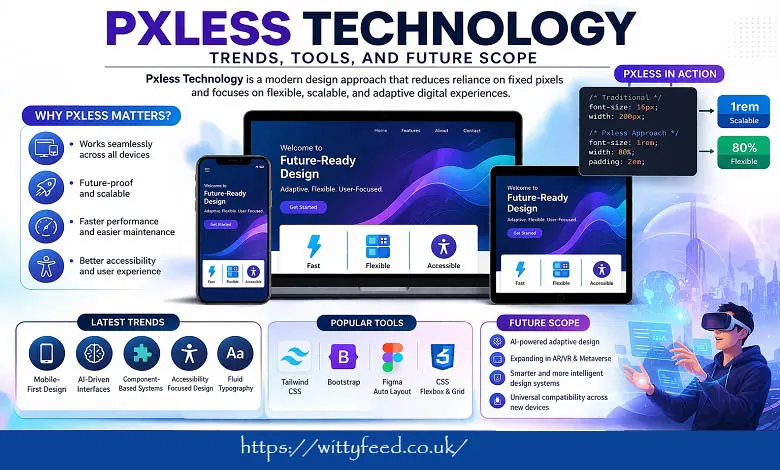
A few years ago, a designer spent hours perfecting a website layout. Every button was exactly 16px, every margin perfectly aligned. It looked flawless—until someone opened it on a mobile phone. Suddenly, the design broke. Text overlapped, buttons shrank, and the experience felt frustrating. This is where Pxless Technology entered the conversation.
Instead of obsessing over fixed pixels, modern designers and developers began asking a different question: “How can this design adapt naturally across devices?” That simple shift in thinking sparked a powerful movement.
Today, Pxless Technology is not just a trend—it’s a smarter, more human-centred way to build digital experiences.
Pxless Technology refers to a modern design and development approach that reduces reliance on fixed pixel values and focuses on flexible, scalable, and adaptive systems.
Instead of defining elements using rigid units like 100px or 16px, it uses:
- Relative units (%, em, rem, vw, vh)
- Fluid layouts
- Scalable typography
- Adaptive components
In simple words, Pxless Technology means designing systems that adjust naturally instead of breaking across devices.
Traditional design:
👉 Make this button 200px wide.
It design:
👉 Make this button feel right on any screen.
This shift focuses on behaviour, proportion, and user experience rather than exact measurements.
The digital world has changed dramatically. People now access content on:
- Smartphones
- Tablets
- Laptops
- Smart TVs
- Wearables
A pixel-perfect design that works on one device often fails on another. It solves this problem by making layouts fluid and responsive.
Real-Life Example
Think about platforms like:
- News websites
- E-commerce apps
- Social media platforms
They must look good on both a 6-inch phone and a 40-inch TV. Pxless Technology ensures a consistent experience across all screens.
1. Fluid Layouts
Layouts adapt to screen size instead of staying fixed.
2. Relative Units
Use of em, rem, %, and viewport units instead of pixels.
3. Content-First Design
Focus on content readability rather than rigid structure.
4. Scalability
Design grows or shrinks without breaking.
5. Accessibility
Interfaces adjust based on user preferences like font size.
| Feature | Pixel-Based Design | Pxless Technology |
| Measurement | Fixed (px) | Flexible (%, rem, em) |
| Adaptability | Low | High |
| Device Compatibility | Limited | Universal |
| Maintenance | High effort | Easier |
| User Experience | Rigid | Smooth & natural |
1. Mobile-First Design
Designers now start with smaller screens and scale up. Pxless naturally supports this approach.
2. AI-Driven Interfaces
AI tools are helping create adaptive layouts that adjust automatically based on user behaviour.
3. Component-Based Design Systems
Reusable UI components that scale dynamically are becoming standard.
4. Accessibility-Focused Design
Pxless improves accessibility because it adapts to user settings like zoom and text size.
5. Fluid Typography
Text sizes adjust based on screen width instead of staying fixed.
Modern tools make it easier to implement Pxless Technology in real projects.
Popular Tools & Frameworks
| Tool/Technology | Use Case |
| CSS Flexbox | Flexible layouts |
| CSS Grid | Responsive structure |
| Tailwind CSS | Utility-first responsive design |
| Bootstrap (latest versions) | Adaptive components |
| Figma Auto Layout | Dynamic design systems |
Traditional:
- Fixed product card size
- Breaks on smaller screens
Pxless:
- Cards resize automatically
- Text adjusts for readability
Traditional:
- Fixed text size
- Hard to read on mobile
Pxless:
- Fluid typography
- Comfortable reading experience
Traditional:
- Rigid layout
- Poor responsiveness
Pxless:
- Flexible widgets
- Adaptive dashboard layout
1. Better User Experience
Users get a smooth experience across all devices.
2. Future-Proof Design
Works well with new screen sizes and technologies.
3. Improved Performance
Simpler layouts often load faster.
4. Easier Maintenance
Less need for constant redesigns.
5. Enhanced Accessibility
Adapts to user preferences and needs.
While powerful, Pxless is not without challenges.
1. Learning Curve
Designers used to pixel-perfect layouts may struggle initially.
2. Requires Strong Systems
Without proper design rules, layouts can feel inconsistent.
3. Tool Limitations
Some tools still rely heavily on pixel-based design.
4. Over-Flexibility Risk
Too much flexibility can reduce visual consistency.
The future of Pxless Technology looks extremely promising.
1. Integration with AI
AI will automate layout adjustments, making Pxless even more powerful.
2. Growth in AR/VR Interfaces
Flexible design is essential for immersive environments.
3. Expansion in Web3 & Metaverse
Dynamic interfaces will require adaptive design systems.
4. Smarter Design Systems
Component-based systems will become more intelligent and scalable.
5. Universal Device Compatibility
From smart glasses to foldable devices, Pxless will play a key role.
Interestingly, Pxless also impacts SEO.
Benefits for SEO:
- Better mobile experience
- Lower bounce rates
- Faster loading speed
- Improved accessibility
Search engines favour websites that provide a smooth and responsive user experience, making Pxless a smart choice for SEO-focused projects.
- Start with relative units (rem, %)
- Use flexible grids and layouts
- Build reusable components
- Focus on content hierarchy
Test across multiple devices
Pxless Technology represents a major shift in how we think about digital design. Instead of controlling every pixel, it encourages us to design systems that adapt, scale, and respond to real users.
In a world filled with countless screen sizes and devices, rigid design simply doesn’t work anymore. Pxless offers a smarter alternative—one that focuses on flexibility, usability, and long-term sustainability.
As technology continues to evolve, Pxless will not just remain relevant—it will become essential. Whether you’re a designer, developer, or business owner, embracing Pxless today means building experiences that are ready for tomorrow.
A. It is a design approach that reduces dependence on fixed pixels and uses flexible layouts instead.
A. No, it is used in web, mobile apps, and digital interfaces.
A. No, it reduces dependency on pixels but does not remove them entirely.
A. For modern multi-device environments, yes—it offers better adaptability.
A. Initially, yes—but it becomes easier with practice and proper tools.